Sloop
https://github.com/tmfset/er-301-custom-unitsA clock synchronized looper
Units
Sloop is a clock synchronized looper that allows you to record audio or CV precisely on the beat. Besides being a recorder, it is also a flexible playback tool that can be used to slice audio and playback those slices in time.

The base unit Sloop is available on the insert menu along with 4 presets:
| Preset | Description |
|---|---|
Sloop (5s) | Create a sloop with a 5 second buffer. |
Sloop (10s) | Create a sloop with a 10 second buffer. |
Sloop (15s) | Create a sloop with a 15 second buffer. |
Sloop Delay (2s) | Create a sloop with a 2 second buffer, configured as a tape delay / freeze. |
Using Sloop
To get started using Sloop it's easiest to pick one of the presets with a pre-configured buffer. Once the unit is created you'll be presented with the main unit view:
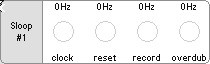
This view shows the four most common controls that you'll need to start slooping. In order to get anything done though, you'll first need to connect a clock signal to the clock input.
Clock View
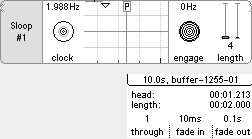
Pressing enter over the clock control reveals the sub-view controls:
| Input | Description |
|---|---|
| clock | The clock to synchronize to. |
| engage | Sloop only plays when it's engaged. |
| length | The number of clock ticks before returning to the start of the buffer. |
Reset View
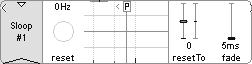
Pressing enter over the reset control reveals the sub-view controls:
| Input | Description |
|---|---|
| reset | Trigger a manual reset on the next clock tick. |
| resetTo | The step to return to on a manual reset. |
| fade | The fade time after a jump to prevent clicks and pops. |
Record View
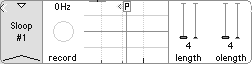
Pressing enter over the record control reveals the sub-view controls:
| Input | Description |
|---|---|
| record | Hold to start a new synced recording from the beginning of the buffer. |
| length | Same as the clock sub-view. |
| olength | The minimum overdub length. |
Overdub View
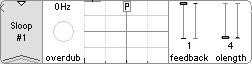
Pressing enter over the overdub control reveals the sub-view controls:
| Input | Description |
|---|---|
| overdub | Press once to start overdubbing up to the minimum overdub length. |
| feedback | The amount of the original buffer to retain when overdubing. |
| olength | The minimum overdub length. |
Menu
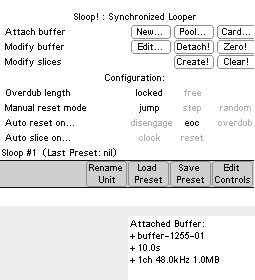
Latest GitHub release
Published on Monday, December 6th 2021