Accents
https://github.com/SuperNiCdAn essential bunch of wonderful units
Units
Dependencies:
core
Installation
V.05
Unzip the Accents-0.5.04.zip file in your ER-301/libs folder. They should appear across the different categories in the main unit list.
V.06
To install Accents (and other packaged mods) on firmware 0.6.x:
- Make sure you are running the required version of the firmware 11 (currently 0.6.14+)
- Download the attached file Accents-0.6.16.pkg
- Copy the .pkg file to your SD card into the folder /ER-301/packages
- Go to the admin area and select Package Manager
- You should see Accents as an available choice along with the core and teletype mods, which will most likely already be installed
- Highlight Accents and press the install button.
Documentation
AB switch
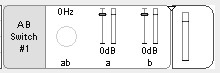
A simple A/B switch for switching between two signal chains. Connect signals to the a and b subchains. If the ab toggle is low, signal a will be output. If the ab toggle is high, signal b will be output.
Pro tip: you can edit the ab control and change it to a gate control if you want this to be a momentary switch.
Pingable Scaled Random
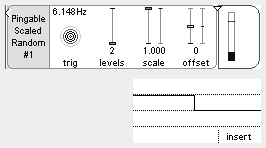
Ping it with a trigger and it spits out and holds a random value until the next ping. You can scale, offset, and quantize it.
Clocked Random Gate
Send it pulses or a clock. You control the probability that a gate will fire when it’s pinged

Weighted Coin Toss
Send a pulse and it outputs heads (1) or tails (0). You can weight it so that it’s more likely to give heads or tails.

Motion Sensor
This one’s the most experimental. I didn’t think it could be done in the middle layer, but it’s actually working decently well. It detects when a CV signal is moving, and can output a toggle, gate, or trigger signal.
Voltage Vault
I think 128 is a good number of vaults/indices. That’s 8 measures of 16th notes, or enough to store translations for an 88-note keyboard. We could go higher. The way it is built now, I don’t think more indices will increase CPU, just RAM. But just a tiny bit of RAM. Let me know if you can think of a reason to go higher (or lower).
When you trigger the store parameter, Voltage Vault will sample whatever voltage is at it’s input into the selected index location. It stores a discrete single floating point value (voltage) per index. The output of the unit is whatever value is stored in the selected index’s memory slot, default 0.0 if you haven’t stored anything there yet. If the bypass parameter is toggled on, Voltage Vault will just pass whatever is at it’s input through to the output. This is probably most useful when building your table of values so that you can “hear” what you’re about to “store.”
So Voltage Vault is essentially a lookup table (LUT). You could potentially use it as a sequencer, or to do translations or arbitrary transfer functions of your own design. Here’s a video I made about it’s predecessor, Voltage Bank, that might give you some ideas.
Maths
| Mode | Formula | Description |
|---|---|---|
| DIV | A/B | division. if B = 0, outputs a very large number (10k) |
| INV | 1 / A | inverse. if A = 0, outputs a very large number (10k) |
| MOD | A % B | modulus. if B = 0, outputs zero |
| TANH | TANH(A) | hyperbolic tangent |
| ATAN | ATAN(A) | arctangent |
The B chain is ignored for INV, TANH, ATAN.
Latest GitHub release
Published on Monday, August 16th 2021